Collecting payments online often means dealing with payment gateways, onboarding, transaction fees, KYC requirements, and settlement delays. But what if you simply want someone to pay you directly through UPI?
That is where UpiLinks comes in.
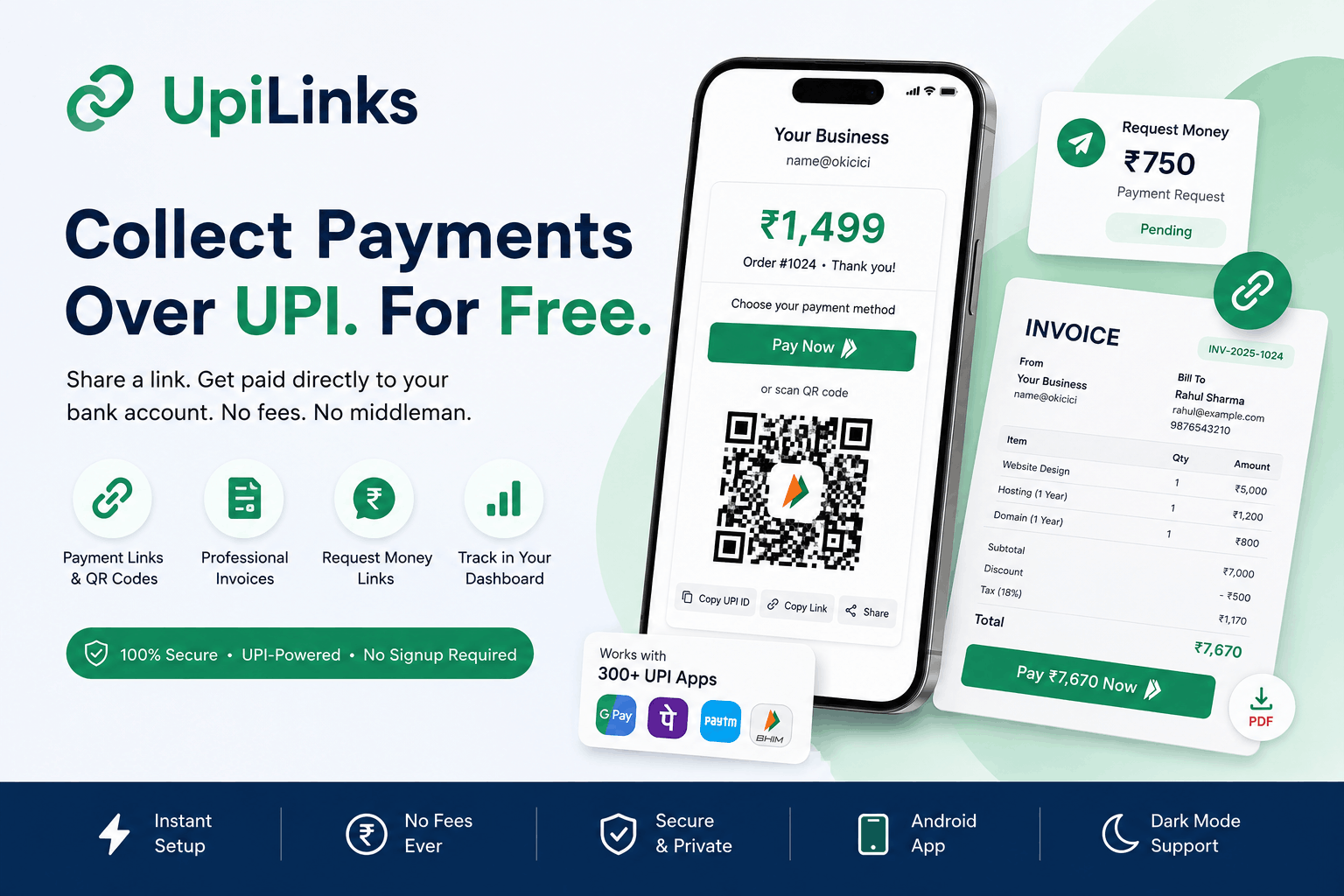
UpiLinks turns your existing UPI ID into a shareable payment link, QR code, invoice, or request-money link in seconds. There is no payment gateway sitting between you and your customer, and you do not need to sign up just to create a basic payment link.
Instead, UpiLinks uses India’s existing UPI infrastructure to create a standard upi://pay payment link and QR code around your own UPI ID.
When a customer pays, the payment goes directly from their UPI app to the bank account associated with your UPI ID.
No gateway in the middle. No gateway commission. No settlement process through UpiLinks.
In short: UpiLinks gives you a simple way to collect money over UPI using links, QR codes, invoices, and payment requests.
What Is UpiLinks?
UpiLinks is a UPI-first payment collection platform designed for individuals, freelancers, creators, tutors, small businesses, service providers, and anyone who wants an easier way to share their UPI payment details.
Instead of sending someone a long UPI ID and asking them to enter it manually, you can create a dedicated payment page.
That page can contain your:
- Name or business name
- UPI ID
- Payment amount
- Payment note
- QR code
- Payment button
- Sharing options
The payer can then open the page, tap Pay Now, scan the QR code, copy the UPI ID, or share the payment page with another person.
The underlying payment still happens through the payer’s UPI app and your UPI account.
This makes UpiLinks particularly useful when you want to put a payment option on WhatsApp, social media, invoices, websites, posters, receipts, or other places where a simple link is more convenient than manually sharing a UPI ID.
1. Free UPI Payment Link Generator
The flagship feature of UpiLinks is its free UPI payment link generator.
You can enter your UPI details and generate a payment page with a corresponding QR code without creating an account first.
How it works
Enter:
- Name or business name: This is displayed to the person making the payment.
- UPI ID: For example,
name@okicicior9876543210@ybl. - Amount: Optional. You can specify a fixed amount or leave it empty.
- Note: Optional. Add information such as “Order #1024” or “Thank you!”
- Expiry date: Optional. Useful when you only want the link to remain available for a limited period.
As you enter the information, the payment page preview updates so you can see how the payment experience will look.
Quick amount buttons
If you frequently collect common amounts, UpiLinks provides quick amount options such as:
- ₹99
- ₹199
- ₹499
- ₹999
- ₹1,499
This makes creating a payment link particularly quick for common transactions.
Leave the amount blank
Not every payment has a fixed price.
By leaving the amount empty, the payer can enter the amount themselves. This is useful for:
- Tips
- Donations
- Flexible pricing
- Contributions
- Informal payments
Download a QR code
Once your payment link is created, you can generate and download its QR code.
That QR can then be used digitally or printed on:
- Shop counters
- Posters
- Receipts
- Menus
- Flyers
- Business cards
- Event displays
No signup required
One of the biggest advantages is that you can create a basic payment link without creating an account.
For a simple “pay me” link, the process can take only a few seconds.
2. The UpiLinks Payment Page
Creating the link is only half the experience. When someone opens the link, they are taken to a dedicated payment page.
The page presents the payment information clearly, including your name, UPI ID, amount, and note when provided.
The payer can then choose how they want to pay.
Pay directly through a UPI app
The Pay Now button can open the payer’s supported UPI application with the payment details pre-filled.
This can work with popular UPI applications such as:
- Google Pay
- PhonePe
- Paytm
- BHIM
- Amazon Pay
- Other compatible UPI apps
The exact app experience depends on the device and UPI applications installed on it.
Scan the QR code
The payer can also scan the displayed QR code using their preferred UPI application.
This is especially useful when the payment page is displayed on another phone, computer, tablet, or printed material.
Copy the UPI ID
Some users prefer to open their UPI app and enter the details themselves.
The payment page therefore also makes it easy to copy the UPI ID.
Copy and share the payment link
You can copy the payment page URL and send it anywhere.
There are also convenient sharing options, including:
- Native device sharing
- Copy link
This makes the same payment page useful across different channels.
3. Professional UPI Invoice Generator
A payment link is ideal for simple payments, but businesses and service providers often need something more professional.
UpiLinks includes a dedicated invoice generator that allows you to create itemised invoices with UPI payment options.
You can access the invoice builder at /create-invoice.
Build an itemised invoice
The invoice can include information about both the seller and customer.
From
Add:
- Business or personal name
- UPI ID
Bill to
Add customer information such as:
- Customer name
- Phone number
Add line items
You can add multiple products or services to the invoice.
Each line item can include:
- Description
- Quantity
- Unit price
The line total is calculated automatically.
The invoice then calculates the running subtotal and final amount as you make changes.
Tax and discount
Invoices can also include:
- Tax
- Discounts
This makes the tool more suitable for service providers and small businesses that need something beyond a basic payment request.
Notes and due dates
You can add additional information such as:
- Payment terms
- Thank-you messages
- Other instructions
You can also specify a due date.
What the customer sees
The completed invoice becomes a shareable invoice page.
It includes:
- Itemised invoice details
- Automatically generated invoice number
- Total amount
- UPI payment button
- Scannable QR code
- Invoice status
The customer can use the Pay ₹total now button to initiate payment through UPI.
Print or save as PDF
The invoice also provides a clean print layout, making it possible to print the invoice or save it as a PDF without unnecessary navigation elements.
Share the invoice
You can share an invoice through:
- Share
- Copy link
This means you do not need to send a separate payment instruction after creating the invoice.
The invoice itself contains the payment experience.
4. Request Money Links
Sometimes you do not need a complete invoice.
You simply need to tell someone:
“Please send me ₹X.”
That is what the Request Money feature is designed for.
The request-money creator lets you specify:
- Your name
- UPI ID
- Fixed amount
- Optional note
- Optional expiry date
You then get a dedicated payment-request page that you can send to the recipient.
What the recipient sees
The recipient gets a focused payment page containing:
- Payment amount
- Pay Now button
- QR code
- Sharing options
- Payment-request status
The request can show statuses such as:
- Pending
- Paid
- Expired
- Cancelled
If an expiry date has been configured, the request automatically becomes unavailable after the expiry period.
Invoice vs. Request Money
Both features help you collect a specific amount, but they serve different purposes.
| Invoice | Request Money |
|---|---|
| Itemised document | Simple payment request |
| Multiple line items | One fixed amount |
| Supports tax and discount | Focused on speed |
| Customer information | Name and UPI details |
| Due date | Optional expiry |
| Print/save as PDF | Quick sharing |
| Better for businesses | Better for simple requests |
Think of an invoice as the professional option and Request Money as the quick option.
If you are billing a customer for several services, create an invoice.
If you simply need someone to send you ₹500, create a payment request.
5. Free Customer Accounts and My Records
You do not need an account to create and share a basic payment link.
However, frequent users may want to keep track of the links, invoices, and payment requests they create.
That is where the optional UpiLinks account comes in.
Guest vs. Account
As a guest
You can:
- Create a payment link, invoice, or request.
- Get the shareable page.
- Send it to your customer.
- Receive payment directly through your UPI account.
No signup is required for the basic experience.
With an account
Creating an account gives you a central place to manage your records.
The dashboard provides at-a-glance information such as:
- Total invoices
- Paid invoices
- Total collected
- Payment requests
- Recent invoices
- Recent payment requests
You can also access dedicated lists for your invoices and payment requests, with links back to their respective shareable pages.
Creating an account
The signup process is lightweight.
You provide:
- Name
- Password
There is also a Remember Me option for convenient future access.
An account is particularly useful if you regularly send invoices or payment requests and want a running record rather than creating everything as a one-time guest.
6. UpiLinks Android App
Prefer managing payments from your phone?
UpiLinks also provides an Android application through Google Play.
The app provides the same core UPI payment-link experience in a mobile-friendly format.
You can use it to:
- Generate UPI payment links
- Manage payment links
- Work with QR codes
- Access support
For users who frequently collect payments while travelling, working remotely, or running a business from their phone, having the tools available as an app can be more convenient than opening a browser every time.
7. Contact and Support
UpiLinks also includes a dedicated contact form for users who need help.
The form allows you to provide:
- Name
- Subject
- Message
The form is protected against automated abuse using security measures such as reCAPTCHA and hidden honeypot fields.
It provides a direct way to contact the team instead of having to search through a large support portal.
8. Small Details That Make UpiLinks Easier to Use
The main features get most of the attention, but several smaller details improve the overall experience.
Dark mode and light mode
You can switch between dark and light themes, and the preference is remembered.
This is particularly useful if you regularly use UpiLinks at different times of the day.
Mobile-first design
The interface is designed to work across phones, tablets, and desktop screens.
Since payment links are frequently created and shared from phones, the mobile experience is especially important.
Multiple sharing options
There is no single required way to share a payment request.
Depending on the situation, you can use:
- Native sharing
- Copy link
- QR code
Private, unguessable payment pages
Invoice and payment-request pages use unguessable URLs.
This helps prevent someone from simply guessing a URL and finding another user’s payment page.
These pages are also designed not to be indexed by search engines.
Anti-abuse protection
Public forms include protections such as:
- reCAPTCHA
- Honeypot fields
- Rate limiting
These measures help reduce automated spam and abuse.
Built around UPI
UpiLinks is designed specifically around India’s UPI ecosystem.
The actual payment takes place through the UPI payment infrastructure rather than through a separate payment balance maintained by UpiLinks.
Who Is UpiLinks For?
UpiLinks can be useful for almost anyone who regularly asks people to pay them.
Freelancers
Send a payment link along with a project quote or after completing work.
Creators
Put a payment link in your social profile, messages, or content descriptions.
Tutors
Create payment requests for individual classes or invoices for recurring services.
Home businesses
Share a payment link with customers without having to build a complete ecommerce website.
Shopkeepers
Print a QR code or payment link and make it easy for customers to pay.
Service providers
Create professional invoices containing itemised services and a UPI payment button.
NGOs and donation campaigns
Leave the amount open when you want supporters to choose how much they want to contribute.
Why Use a UPI Payment Link Instead of a Payment Gateway?
Payment gateways are valuable when you need features such as card payments, checkout infrastructure, transaction processing, refunds, and automated payment notifications.
But they can be unnecessary when your customers already use UPI.
With a UPI payment link, you can simply use your existing UPI ID.
There is no need to create a separate merchant payment balance just to receive the money. The payment goes directly to the bank account connected to the UPI ID.
That can make UpiLinks particularly attractive for people who want a lightweight payment-collection experience rather than a complete payment-processing platform.
How to Create Your First UPI Payment Link
Getting started is simple.
Step 1: Generate
Enter your name, UPI ID, and optionally an amount, note, and expiry date.
Step 2: Share
Copy the payment link, send it through WhatsApp, use your device’s sharing options, or download the QR code.
Step 3: Get paid
Your customer opens the page, taps Pay Now or scans the QR code, and completes the payment through their UPI application.
The money goes directly to your UPI-linked bank account.
Important Things to Know Before Using UpiLinks
Transparency matters, especially when dealing with payments.
There are a few important limitations to understand.
Payment status is not automatically detected
UpiLinks does not operate a payment gateway or receive payment webhooks from your bank.
Therefore, it cannot independently verify every payment in real time.
If an invoice or payment request displays a payment status, users should understand that payment status management is not equivalent to automatic bank-side payment confirmation.
Always verify the actual payment in your bank or UPI application before considering a transaction complete.
Your payment information is stored
UpiLinks generates shareable payment pages, invoices, and requests that live at URLs.
The service should therefore not be described as a system where everything runs exclusively in the browser or where nothing is stored.
Double-check your UPI ID
UpiLinks does not verify whether the UPI ID you enter actually belongs to you or is valid.
If you enter the wrong VPA, the payment link can still be generated.
Always check your UPI ID carefully before sharing a payment link.
There is no built-in refund or dispute layer
Because the payment goes directly through UPI from the payer to the recipient’s bank account, UpiLinks does not provide an escrow or buyer-protection system.
For disputes, refunds, or transaction issues, the relevant UPI app, bank, or applicable UPI dispute process may need to be used.
UPI infrastructure vs. UpiLinks
When describing UPI as government-approved or regulated infrastructure, that refers to the underlying UPI ecosystem and its applicable regulatory framework.
It should not be interpreted as UpiLinks itself being government-certified or endorsed.
UpiLinks Features at a Glance
| Feature | Signup Needed? | Key Benefit |
|---|---|---|
| UPI payment link + QR | No | Get paid with a link you can share anywhere |
| Optional amount, note and expiry | No | Flexible for tips, donations and one-off requests |
| Payment page | No for payer | Pay, scan, copy or share |
| Professional invoices | No, but better with an account | Itemised billing with tax, discount, PDF and UPI payment |
| Request-money links | No, but better with an account | Quickly request a fixed amount |
| Customer account + dashboard | Yes, free | Save and track your records |
| Android app | No | Create and manage links from your phone |
| Dark mode, sharing and QR download | No | Convenient everyday experience |
Frequently Asked Questions
Is UpiLinks free?
The core UPI payment-link creation experience is free. UpiLinks does not take a payment-gateway commission from the UPI transaction because the actual payment happens directly between the payer and your UPI-linked bank account.
Do I need an account to create a payment link?
No. You can create and share a basic UPI payment link without signing up.
An account is useful if you want to save and manage your invoices and payment requests from the dashboard.
Does UpiLinks hold my money?
No. UpiLinks is not the payment gateway in the middle of the transaction.
The payment is initiated through UPI and goes to the UPI ID you provide.
Can I create a QR code for my UPI ID?
Yes. The UPI payment-link generator creates a QR code that you can download and share or print.
Can I set a fixed payment amount?
Yes. You can specify an amount when creating a payment link or request.
You can also leave the amount blank for use cases where the payer should decide how much to pay.
Can I make a payment link expire?
Yes. Payment links and payment requests can have an optional expiry date.
This is useful for temporary payment requests, campaigns, events, or one-off transactions.
Does UpiLinks verify my UPI ID?
No. You should carefully verify the UPI ID before sharing your payment link.
Which UPI apps can customers use?
Customers can use compatible UPI applications available on their device, including popular apps such as Google Pay, PhonePe, Paytm, BHIM, and Amazon Pay.
Can I create an invoice?
Yes. UpiLinks provides an invoice builder with line items, quantity, pricing, tax, discount, notes, due date, QR code, and a UPI payment button.
What is the difference between an invoice and Request Money?
An invoice is designed for professional, itemised billing.
Request Money is designed for quickly asking someone to pay a specific amount.
Can I save invoices and payment requests?
Yes. You can create a free UpiLinks account to keep your records in the dashboard.
Does UpiLinks automatically know when I have been paid?
No. Because UpiLinks is not processing the payment through a gateway and does not have access to your bank’s payment confirmation webhook, payment status should not be treated as automatic bank verification.
Always verify payments through your bank or UPI application.
Start Collecting Payments With UPI
You do not always need a complicated checkout system to collect a payment.
If your customers already use UPI, a simple payment page can be enough.
With UpiLinks, you can create a free UPI payment link, QR code, professional invoice, or request-money link, share it through WhatsApp or anywhere else, and let the customer pay through their preferred UPI app.
The basic workflow is simple:
Generate → Share → Get paid.
No complicated checkout setup. No payment gateway in the middle. No need to build a website just to accept a UPI payment.
Create your first free UPI payment link with UpiLinks and make collecting payments as simple as sharing a link.